GOHIGHLEVEL ANSWERS & PROMPTS: PLAYBOOK T26 · WALLET BILLING & RE-ENTRY GUARDS
AUTHOR: DANIEL HALLMAN
KEYWORD: $10 RECHARGE LOOP
STEP-BY-STEP INSTRUCTIONS + ANNOTATED GHL SCREENSHOTS
Steps in GoHighLevel
-
STEP 1In Automation > Workflows > Execution Logs (and Agency View > Settings > Billing > Wallet & Transactions), open the detailed credit transaction log to see which sub-account and service (
LC Phone,LC Email, orConversation AI) is draining$10blocks.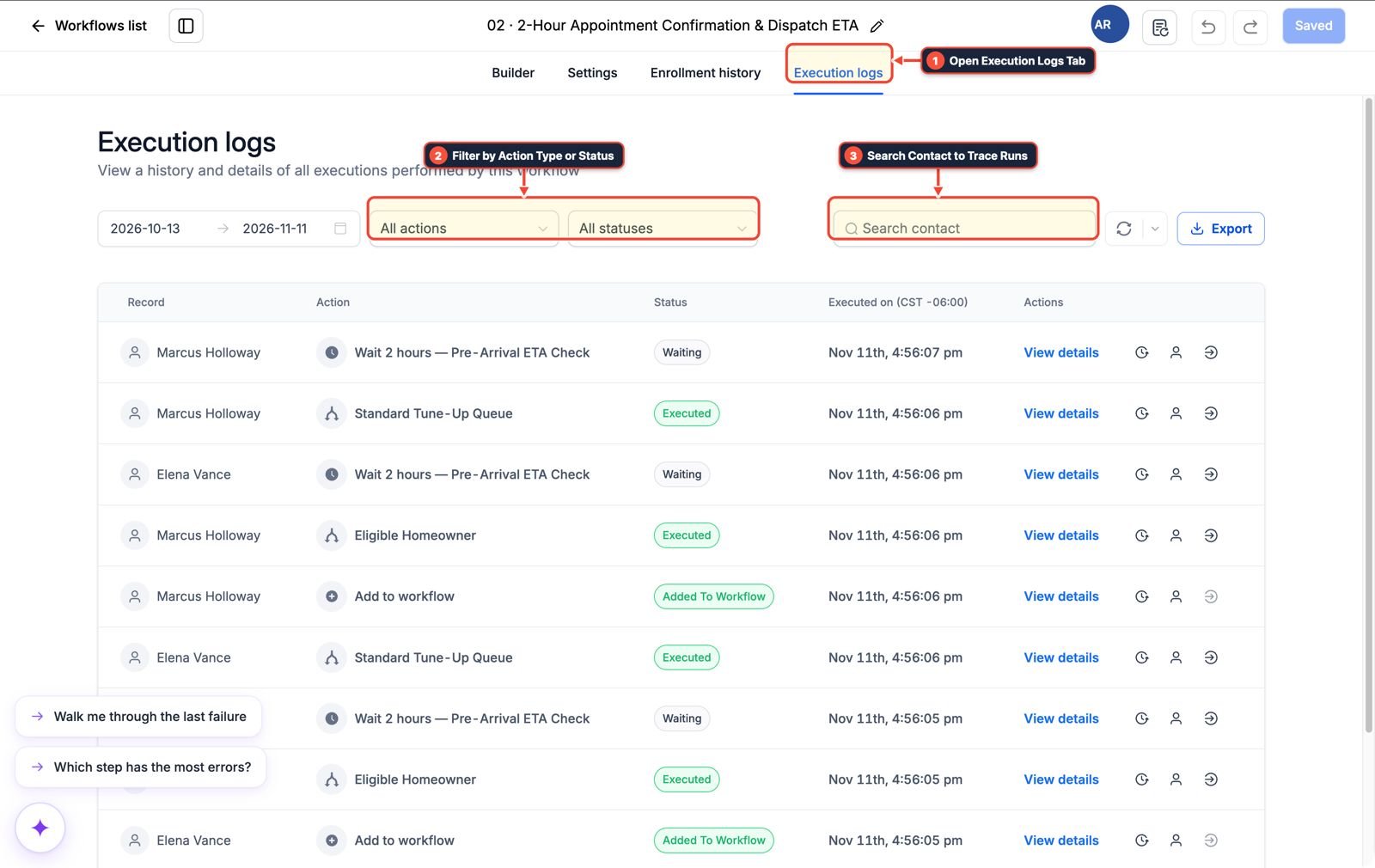
1Open Execution Logs Tab 2Filter by Action Type or Status 3Search Contact to Trace Runs -
STEP 2In Automation > Workflow > Settings, open the active workflow burning credits and turn off Allow Re-entry (or turn on Stop on Response) so a contact cannot cycle repeatedly through SMS or AI steps.
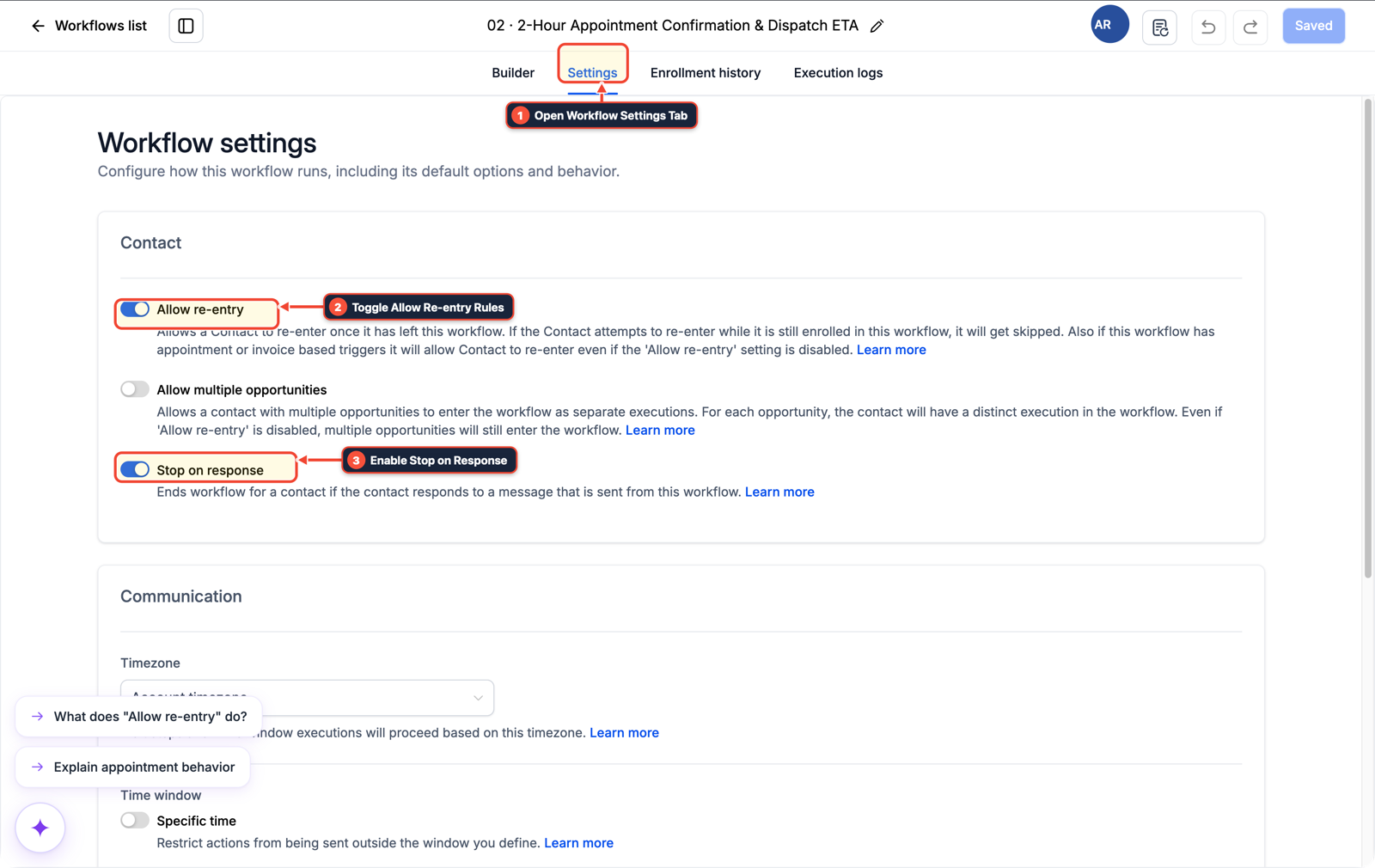
1Open Workflow Settings Tab 2Toggle Allow Re-entry Rules 3Enable Stop on Response -
STEP 3In Settings > Phone System (and Settings > Company Billing > Auto-Recharge), set the wallet reload amount to
$50or$100when the balance drops below$10so normal daily messaging does not trigger multiple small card charges.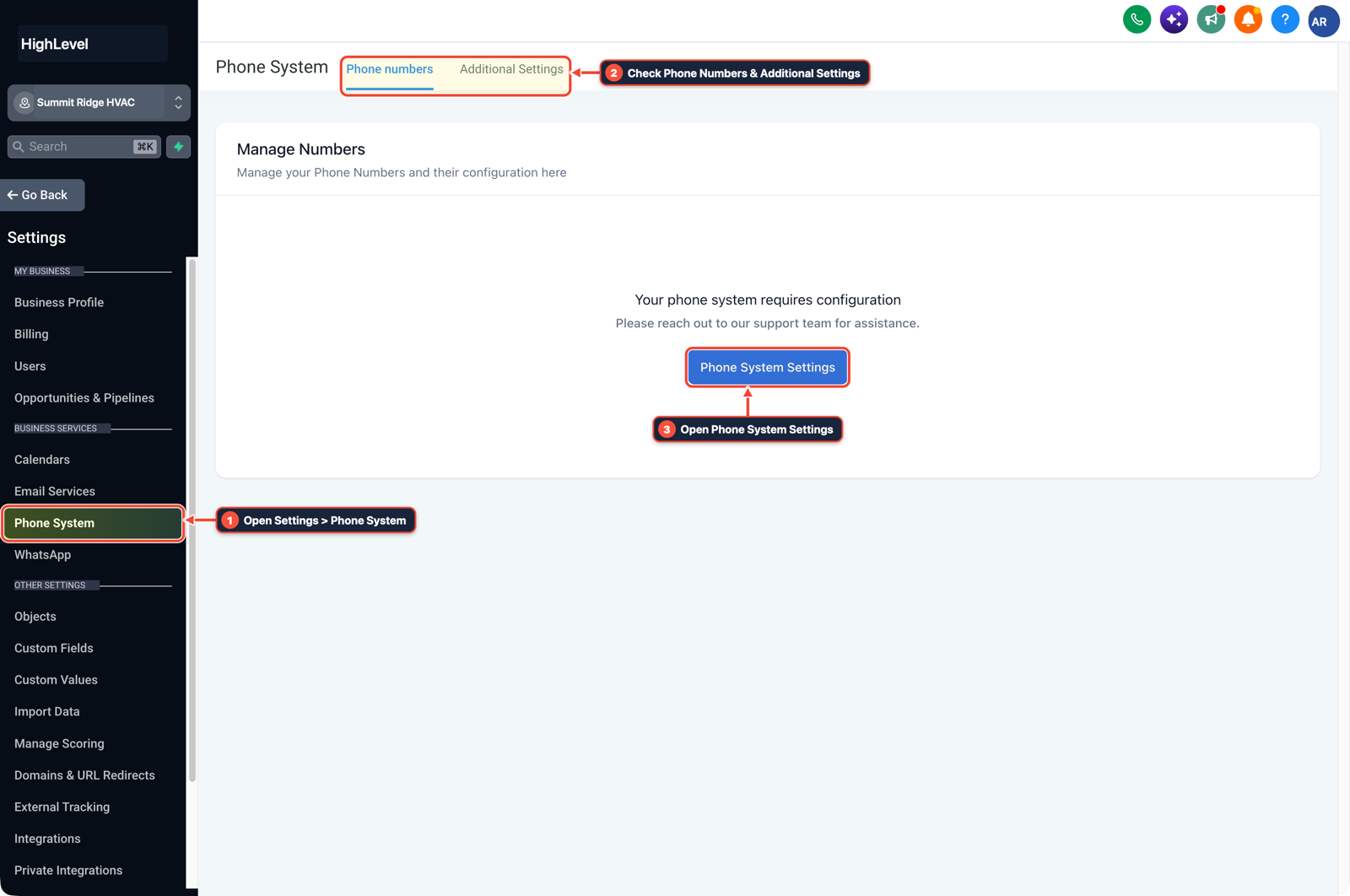
1Open Settings > Phone System 2Check Phone Numbers & Additional Settings 3Open Phone System Settings
MODE: AGENT PROMPT
PASTE INTO CLAUDE CODE, CURSOR, CHATGPT, OR GOHIGHLEVEL ASK AI
AGENT PROMPT
Audit and stop a $10 wallet auto-recharge loop in sub-account <YOUR_LOCATION_ID>:
1. Inspect Wallet & Transactions and Automation > Workflows > Execution Logs to identify which workflow or AI agent is consuming LC Phone, LC Email, or AI credits every few hours.
2. In Automation > Workflow > Settings on the offending workflow, disable Allow Re-entry and enable Stop on Response.
3. In Agency View > Settings > Billing > Wallet & Transactions, update Auto-Recharge from $10 to $50 or $100 once the workflow loop is paused.
GHL-TOOLS MCP SERVER & CLI (DANIELHALLMAN.COM/MCP)
BUILDER + SUB-ACCOUNT TOOLS
# Check agency health and list active workflows in the sub-account draining wallet credits
ghl-agency doctor --context <YOUR_CONTEXT>
ghl-crm workflows list --context <YOUR_CONTEXT> --location <YOUR_LOCATION_ID>
Official GHL MCP vs. ghl-tools: HighLevel’s official hosted MCP (services.leadconnectorhq.com/mcp) covers public v2 CRM records (contacts, opportunities, appointments, conversations). ghl-tools MCP complements it with workflow graph inspection & recipes, funnel/form builders, DNS/BIMI checks, and ghl-crm doctor audits.
Cause
- GoHighLevel bills usage-based services (SMS segments, outbound calls, emails, and AI tokens) against a prepaid credit wallet rather than invoicing each message individually.
- When the default auto-recharge rule is set to Reload $10 when balance drops below $10, a runaway workflow loop or a high-volume SMS/AI campaign crosses that floor every few hours and charges your saved card $10 each time.
GoHighLevel Configuration
- Inspect the Wallet & Transactions detailed log to identify the exact sub-account and workflow spending credits, turn off Allow Re-entry on the looping workflow
- and increase both the wallet recharge amount and sub-account SaaS re-billing floor.
GoHighLevel Menu Paths
| Step | Menu Path in GHL | Action |
|---|---|---|
| Step 1 | Automation > Workflows > Execution Logs | In Automation > Workflows > Execution Logs (and Agency View > Settings > Billing > Wallet & Transactions), open the detailed credit transaction log to see which sub-account and service (LC Phone, LC Email, or Conversation AI) is draining $10 blocks. |
| Step 2 | Automation > Workflow > Settings | Open the active workflow burning credits and turn off Allow Re-entry (or turn on Stop on Response) so a contact cannot cycle repeatedly through SMS or AI steps. |
| Step 3 | Settings > Phone System | In Settings > Phone System (and Settings > Company Billing > Auto-Recharge), set the wallet reload amount to $50 or $100 when the balance drops below $10 so normal daily messaging does not trigger multiple small card charges. |
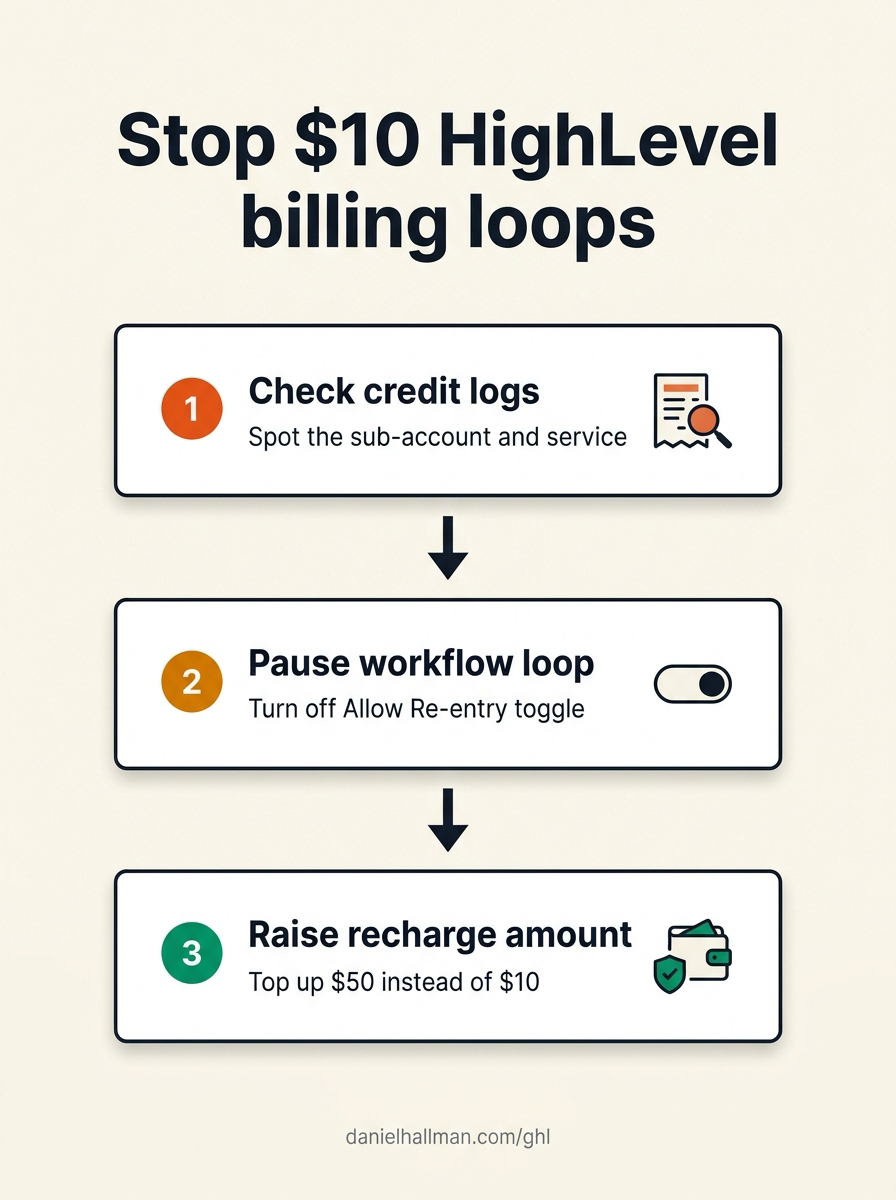
DEFAULT SETUP VS. AUTOMATED WORKFLOW
Operational Comparison
Manual Admin Work Per Client
Lead-to-Booked-Job Conversion
Related Questions
BUILD FASTER IN GOHIGHLEVEL · FREE TRIAL BONUSES + MCP SERVER
Build this directly inside your GoHighLevel sub-account
Connect Claude Code, Cursor, or OpenAI Codex to our ghl-tools MCP Server & Rust CLI to build workflows, forms, and funnels from your editor, or start your GoHighLevel plan through our partner link to unlock $612+ in ready-to-import kits (including GHL Wallet & Workflow Loop Guard Pack) and weekly live clinics.